Session notes that never leave your computer.
CouchNotes listens, transcribes, and drafts your SOAP, DAP, or BIRP note entirely on your computer — no cloud, no account, no subscription. Your client's words stay in the room.
Free during the public beta. Confirm your email and we'll send your download link — no spam, leave anytime.
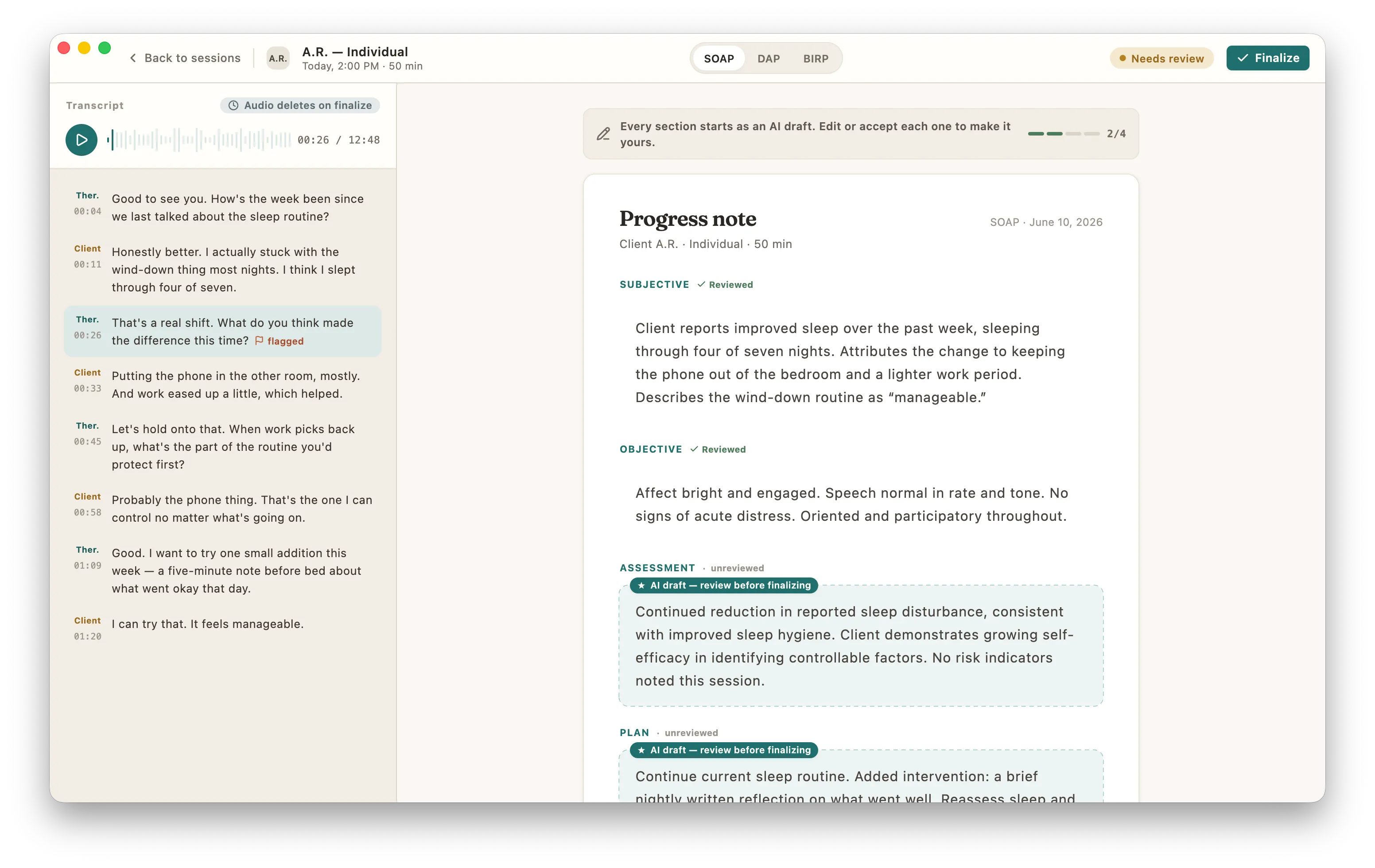
How it works
From session to signed note, without the internet.
Three steps. The audio and the transcript exist in exactly one place: your computer.
-
Capture
Record in session, dictate a summary afterwards, or drop in an existing audio file. Dictation mode means the client is never recorded — your voice, your summary.
-
Transcribe & draft
Local models transcribe the audio, separate speakers, and draft a note in your format — SOAP, DAP, BIRP, or your own template. All of it happening on your computer.
-
Review & finalize
Every AI draft stays a draft until you touch it. Edit, finalize, copy into your EHR. Audio is deleted from your computer when you finalize — that is the default, not a setting you hunt for.
Privacy
“HIPAA compliant” tells you it’s legal. It doesn’t tell you where the audio goes.
Cloud scribes upload your client’s voice to someone else’s servers and ask you to trust their retention policy. CouchNotes removes the question: nothing leaves the device.
-
Audio lives in one place
Recordings are written to a local app folder on your computer — a location you can open in your file manager. They are never uploaded, mirrored, or "synced for processing".
-
Audio is deleted when you finalize
Finalizing a note deletes its audio from your computer by default. You choose a longer retention window only if you want one.
-
The models run here, not in a data center
Transcription and drafting use open models downloaded to your computer. Unplug the network — CouchNotes keeps working.
-
No accounts, no session telemetry
There is nothing to sign into and no analytics attached to your sessions. A license key, validated offline, is the whole relationship.
-
Chat with your notes stays on your computer
Asking questions about a client’s notes uses an on-device search and the same local model that drafts them. The notes, the question, and the answer never leave the device.
Recorded, transcribed, and drafted on this device.
Built for how therapists actually work
The details that decide whether you’ll still use it in March.
-
Dictation mode
Client doesn’t want to be recorded? Dictate a summary after the session — guided cues, segment-by-segment re-recording, no client audio at all.
-
Bring your own recording
Drag in an audio file from any recorder or telehealth export. CouchNotes transcribes and drafts from it like any other session.
-
SOAP, DAP, BIRP — or yours
Switch formats per client. Build custom templates with per-section instructions the drafting model actually follows.
-
Consent templates included
Client-facing AI consent forms ship in the app — print them, adapt them, log who signed what and when.
-
Works offline
Airplane mode is a supported configuration. Models live on disk; nothing about your workflow needs a connection.
-
Copy straight into your EHR
Finalized notes copy out as clean text or markdown, formatted for SimplePractice, TherapyNotes, or wherever your charts live.
-
Amend without rewriting
A finalized note stays locked — but you can append a dated addendum any time. Late entries are stamped, never edited, so the record stays honest.
-
Chat with your notes
Ask a question about one client’s history — recurring themes, last session’s homework, progress on a goal. Answers are drawn only from that client’s finalized notes, with the session dates cited, and the whole search runs on your computer.
Pricing
Free during the public beta.
CouchNotes is free to use while it's in public beta. When we launch it's a one-time license — not one price per month. Because nothing runs on our servers, there's never a meter running on you.
Free during the public beta
Then a one-time $199 license when we launch — no subscription, ever.
- Unlimited sessions and notes
- All formats: SOAP, DAP, BIRP, custom templates
- Dictation mode and audio import
- 12 months of updates — then the app is yours to keep
- No card and no account to download the beta
Year one with a cloud scribe
| Service | Price | Year one | Where audio goes |
|---|---|---|---|
| Freed | $99/mo | $1,188 | Cloud · subscription |
| Upheal | from $49/mo | $588+ | Cloud · subscription |
| Mentalyc | from $39/mo | $468+ | Cloud · subscription |
| CouchNotes | Free in beta | $0 | Stays on your computer |
Competitor prices as listed publicly, June 2026. CouchNotes is free during the public beta; after launch it's a one-time $199 license — so it pays for itself against the cheapest cloud scribe in months, then it's free. Want the detail? Read the full comparisons or the Mac scribe roundup.
Questions
Asked by careful people.
What computer do I need?
On Mac: an Apple Silicon Mac (M1 or newer) running macOS 13 or later; the transcription and drafting models use the M-series chip, so Intel Macs are not supported. On Windows: a 64-bit Windows 10 or 11 PC with an x64 processor that supports AVX2 — 16 GB of RAM is recommended (8 GB is the minimum and runs a smaller drafting model), about 6 GB of free disk for the models, and no GPU is required since everything runs on the CPU.
How big is the model download?
Plan for roughly 4 GB, downloaded once during setup and stored on your computer. After that, no connection is needed to work.
Does the audio really never leave my computer?
Yes. There is no CouchNotes server that processes sessions — transcription and drafting run as local processes on your machine. You can keep working with Wi-Fi turned off.
When is session audio deleted?
When you finalize a note, its audio is deleted from your computer. That is the default. If you prefer a retention window, you set one explicitly in Settings.
What note formats are supported?
SOAP, DAP, and BIRP out of the box, plus custom templates where you write per-section instructions for the drafting model.
My client doesn’t want to be recorded. Is this still useful?
Yes — dictation mode is built for exactly that. After the session, you speak a summary in your own words and CouchNotes structures it into your note format. No client audio is ever captured.
Can I ask questions about a client’s notes?
Yes. You can chat with one client’s finalized notes — “what were the recurring themes?”, “did we set homework last session?” — and get an answer grounded only in their notes, with the session dates cited. If something isn’t in the notes, it says so rather than guessing. The search and the answer both run on your computer; nothing is uploaded.
Can I change a note after I finalize it?
A finalized note is locked — that is deliberate, because a signed clinical record should not be quietly rewritten. What you can do is append a dated addendum: a timestamped late entry that sits below the note and travels with it into your EHR export. The original note is never altered, so the record stays defensible.
How do notes get into my EHR?
Finalized notes copy out as clean plain text or markdown, ready to paste into SimplePractice, TherapyNotes, or any EHR with a notes field. There is no integration to break.
What languages does it support?
English and Spanish sessions are supported at launch — both transcription and note drafting. More languages are planned.
What does it cost?
CouchNotes is free to use during the public beta — no credit card, no account, just download it and go. When we launch it becomes a one-time license you own for good; there’s no subscription, ever. If it doesn’t earn its place in your workflow, delete it and you’ve spent nothing.
Do I have to pay for updates?
Your purchase includes 12 months of updates from the day you buy. After that the app keeps working forever, exactly as it is — no expiry, no feature lockout, nothing held hostage. If you want another year of updates, you can renew; if you’re happy with the version you have, you simply keep using it. You only ever pay again if you want newer versions.
Is CouchNotes HIPAA compliant?
HIPAA compliance is a property of your practice, not a software badge. What CouchNotes gives you is stronger and simpler to reason about: session audio and notes are processed and stored only on your computer, so there is no third-party disclosure to evaluate. Consent templates are included for documenting client agreement.